ByteForge allows users to upload their code from replit for shareable, live webpages, effectively bringing back the run button.
1 Open any Replit project (static sites only)
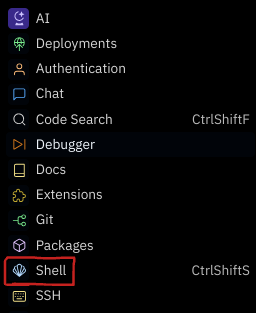
2
Find the "Shell" in the tools menu
3 Copy and Paste this script into the shell. (view source code)
curl -s https:///upload.sh | bash -
4 Done! A link to your hosted project will be provided in the shell once uploading has finished.
Replit discontinued free hosting in January 2024. This means that if you want to run a project you don't own, you have to fork it. With ByteForge, the owner of the project can upload their code, making it available publicly, allowing anyone to view the code and the hosted output.